Spatial computing — coming soon

Your desktop, in your space.

Remio for Apple Vision Pro turns your Mac, Windows PC, or studio rig into a floating workspace in 3D. Your gaze controls the cursor. A pinch is a click. Multiple host displays arrange themselves around you in spatial windows. It is the same native Remio client that ships on iPad and Mac — visionOS is just the next device.

Spatial preview

What a Remio session looks like on Vision Pro

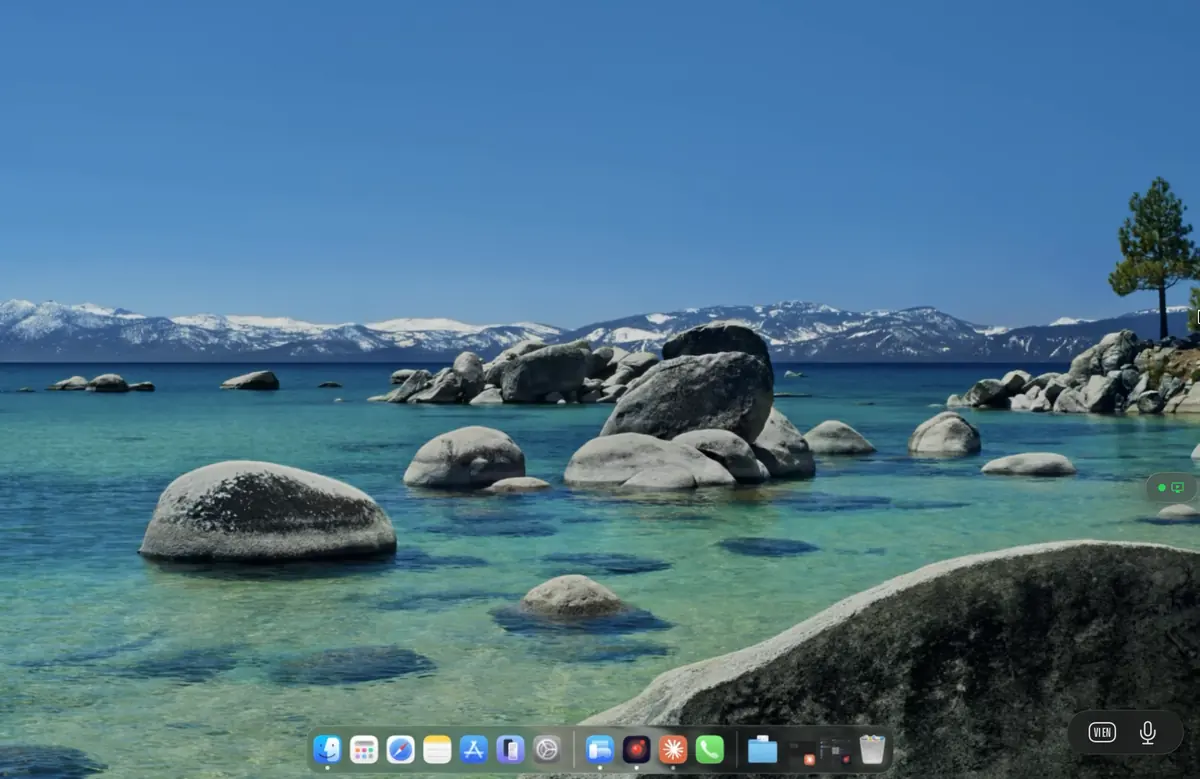
A simulated view of the spatial workspace Remio is building. Your host’s primary display sits at eye level, side panels flank it for chat and reference, and four annotation pins call out the spatial-input features that make the session feel native to visionOS.

Gaze cursor
Where you look is where the pointer hovers.
Anchor mode
The workspace stays where you placed it, or follows.
Pinch to click
Natural visionOS gesture, no controllers.
Multi-window
Each host display gets its own spatial pane.
Concept rendering — visionOS phase 01 (virtual display) is in development; phases 02-04 follow on the roadmap below.
Why native matters

Built for spatial from day one

Remio is not a web app being adapted for Vision Pro. It is 100% native, built with the same Apple frameworks visionOS uses for its own apps — which is why Remio can target spatial computing seriously, not as an afterthought.

01
Reason 01 — Native

100% native — visionOS is just another device

Remio is built with the same Apple frameworks visionOS uses for its own apps. No web wrapper. No browser hack. The same networking and streaming that power the iPad and Mac clients carry straight over to Vision Pro.

One Remio across devices — one networking and streaming engine across iPad, Mac, and Vision Pro
Spatial-ready — spatial windows and 3D anchors with no abstraction layer in between
02
Reason 02 — Low latency

Sub-5 ms on a local network — spatial demands every millisecond

Motion sickness kills VR apps. Remio delivers sub-5 ms latency over a local network with a direct device-to-device connection — the kind of glass-to-glass numbers that keep a spatial session feeling like the real machine, not a video feed.

Direct device-to-device, no relay — packets travel straight between your devices when the network allows
Hardware accelerated — H.265 at 4K 60 fps with single-digit-ms overhead
03
Reason 03 — Many displays

Multiple virtual displays — arrange them around you

One screen is not enough. Remio’s multi-display architecture means each monitor on your host streams into its own spatial window. Place them in an arc, stack them vertically, mirror them across the room — you decide the layout.

04
Reason 04 — Privacy

Zero-knowledge privacy — your spatial workspace stays yours

A spatial workspace is a private space. End-to-end encryption means even Remio cannot see your screens. No accounts, no telemetry, no compromise — pair with a 4-digit PIN and connect.

05
Reason 05 — AI in spatial

AI-powered spatial UI — on the roadmap

Remio AI becomes a spatial assistant — voice commands to arrange windows, AI-suggested layouts, smart workspace management that learns your habits. The same on-device intelligence that ships in Remio AI today, extended into 3D space.

Who it is for

Every professional, elevated

Vision Pro reshapes every workflow that benefits from screen real estate. Here is how four kinds of professional are likely to use Remio when the visionOS client lands.

Developers

Xcode on a cinema-sized screen. Terminal floating to your left. Documentation pinned to your right. The ultimate coding cockpit, anywhere you sit.

Infinite display

Designers

Figma and Photoshop in immersive space. See designs at scale. Colour-accurate, lag-free creative workflow — with the Apple Pencil precision Remio already ships.

4K · 60 fps

Gamers

PC gaming on a 100-inch virtual screen, from the couch. Ultra-low latency means competitive play, not just casual sessions. Bring your own GPU — no lock-in to a specific cloud vendor.

<5 ms input

Traders

A six-screen trading desk that fits in a bag. Charts, tickers, and news streams arranged around you — anywhere in the world, on any network, all encrypted end-to-end.

6× displays
Roadmap

The path to spatial

Honest milestones, no vapourware. The visionOS client is being built step by step on top of the same engine already shipping on iPad and Mac.

Phase 01 — In development
Virtual display

Your Mac desktop as a single floating screen in Vision Pro. Full resolution, full fidelity, sub-5 ms streaming over a local network in a spatial window you can place anywhere in the room.

Active
Phase 02 — Planned
Multi-display workspace

Multiple virtual monitors arranged around you in 3D space. Each display independently resizable and positionable — the spatial multi-monitor setup you have always wanted.

Planned
Phase 03 — Roadmap
Gesture control

Move beyond look-and-pinch. Natural hand gestures to scroll, resize, and interact with the remote desktop. Spatial trackpad, air keyboard, richer mid-air input.

Roadmap
Phase 04 — Roadmap
Spatial UI elements

Toolbar floating beside you. Notification bubbles in your peripheral vision. AI assistant as a spatial companion. The remote desktop becomes truly three-dimensional.

Roadmap
FAQ

Common questions

Four questions the visionOS plan tends to raise — honest answers below.

Not yet. Remio for visionOS is in active development — phase 01, virtual display, is the first milestone. The native Remio client already runs on iPad and Mac, and the same engine carries straight over to visionOS. Join the waitlist below to be notified when the visionOS build is ready for early access.
On Vision Pro, your gaze maps to cursor hover on the remote machine, and a pinch gesture is forwarded as a click. The same input path that ships on the iPad and Mac clients carries the spatial gestures across to the host. Eye-tracking data stays on-device; only the resolved cursor coordinates are sent to the host.
Phase 02 of the visionOS roadmap. Each monitor on your host machine streams into its own spatial window, and you arrange them anywhere in 3D space — in an arc around you, stacked vertically, or anchored to a wall. Multiple displays already work on Mac and iPad; the visionOS work is the spatial window-management layer on top.
Mac Virtual Display only works with a directly-paired Mac on the same Apple ID, in the same room, over a direct Wi-Fi link. Remio works between any two devices on any network — a Vision Pro at home and a Mac at the office, or a gaming PC across the country. Remio also targets sub-5 ms local-network latency for spatial sessions, supports Windows hosts in addition to macOS, and is account-free with end-to-end encryption.

Be first to go spatial

Join the waitlist to be among the first to experience Remio on Apple Vision Pro. Early access, candid build notes, and a chance to shape the future of spatial remote desktop.

No spam, ever. Just spatial computing updates.