✦Pricing

One plan. One price.Remio Pro, $1.99 a month.

Remio is free to use — no time limits, no commercial-use detection — and everything that was free before Remio Pro stays free, forever. Remio Pro adds extra screens, a gamepad you design, files both ways on any connection and more. Try it free for 7 days.

Remio Free

The complete remote desktop, for everyone.

$0no time limit

No card. No account. No catch.

Download free
  • Up to 6K at 120 fps · ~8 ms LAN processing latency
  • Unlimited sessions, no time limits
  • As many computers as you like
  • Native apps on 10 platforms
  • A display shaped to your device
  • Lid-closed streaming & remote unlock
  • Control Board, touch gamepad & controllers
  • Send files to your computer
  • System audio & clipboard sync
  • End-to-end encryption, no account

Free for personal and commercial use.

7-day free trial
Remio Pro Pro

For people who live in their remote desktop.

$1.99/ month

Billed monthly by Apple or Google · cancel anytime

Start your free trial→
  • Everything in Free, plus
  • Extra virtual displays for your computer
  • Remap your controller, with a profile for every game
  • Receive files your computer sends you
  • File transfer on any connection — even relayed
  • Choose which speaker your computer plays through
  • Split Keyboard on your phone
  • USB devices from your Mac, on the Mac you control
  • In the works — included when they ship
  • All your computer's screens at once Soon
  • Full mouse control for first-person games Soon
  • USB devices from your Android phone or tablet Soon

Subscribe in the Remio app on iPhone, iPad, Mac or Android. Pro works everywhere you sign in — Windows too.

7-day free trial Cancel anytime One subscription, every device
✦Remio Pro

Power you can feel on day one.

Pro lives right inside the panels you already use. These are real screens from Remio on iPhone.

Pro

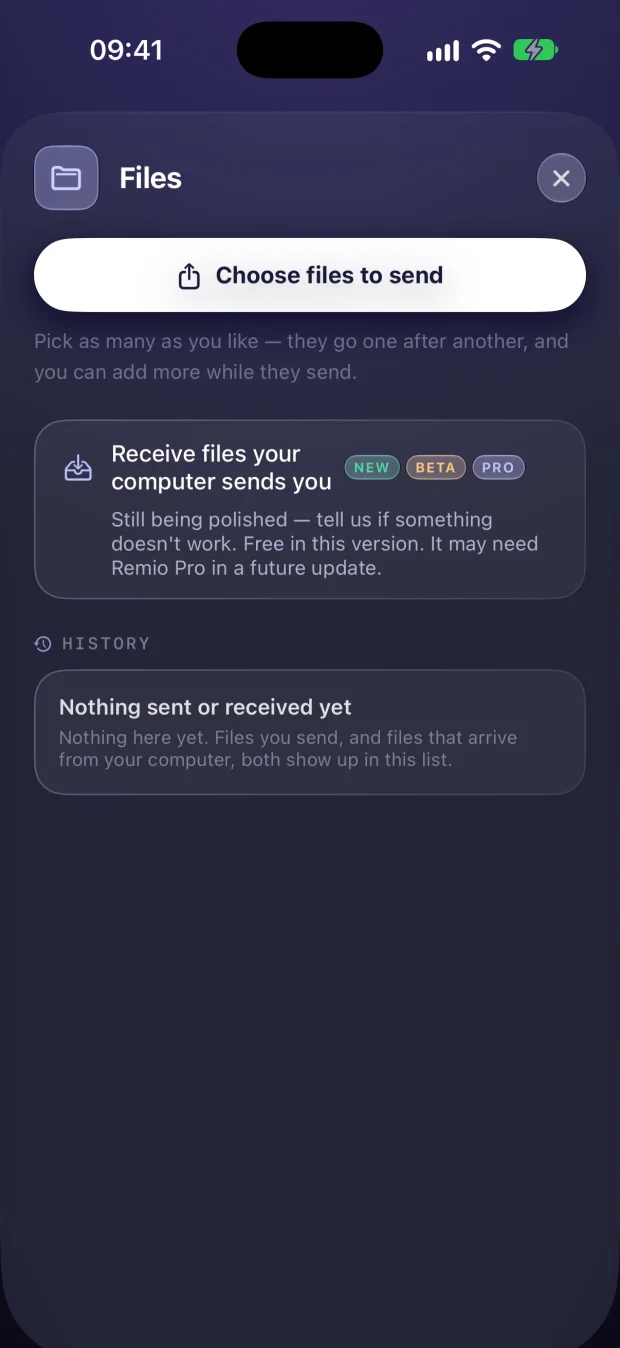
Files, both ways

Your computer sends files straight to your phone — on any connection, even relayed.

Remio Files panel on iPhone: send files, and receive files your computer sends you
Pro

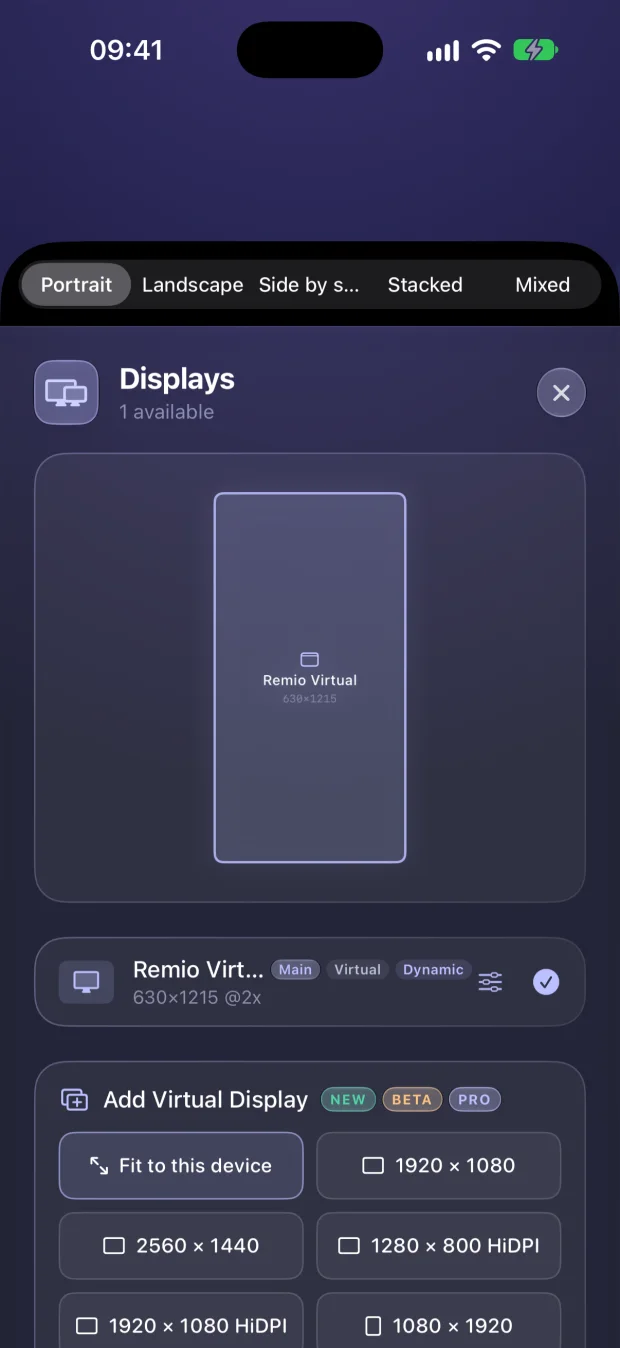
Extra virtual displays

Add screens that exist only for Remio — fitted to your device, or any size up to HiDPI.

Remio Displays panel on iPhone: add a virtual display
Pro

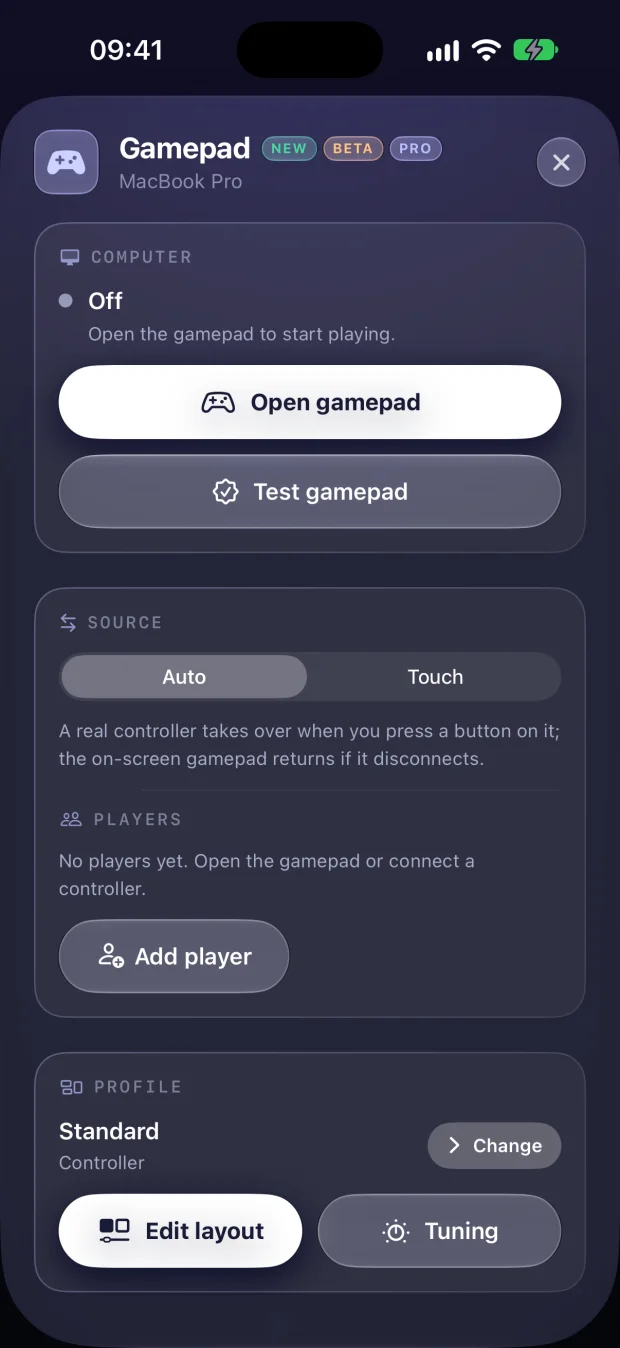
Your gamepad, per game

Remap every control, tune the feel, save a profile — Remio switches it with the game.

Remio Gamepad panel on iPhone: players, source and per-game profile
✦Compare plans

Everything, side by side.

FeatureFree
Up to 6K at 120 fps, hardware H.265
~8 ms processing latency on LAN
End-to-end encryption, peer-to-peer
Session length & number of sessionsUnlimitedUnlimited
Computers & devicesUnlimitedUnlimited
Display shaped to your device
Extra virtual displays
All your computer's screens at onceSoon
Send files to your computer
Receive files from your computer
File transfer over relayed connections
Touch gamepad & real controllers
Remapped controls & per-game profiles
Mouse-look for first-person gamesSoon
USB devices, Mac to Mac
USB devices from AndroidSoon
System audio in sync
Pick which speaker your computer plays through
Split Keyboard on phones
Control Board, blank & lock
Lid-closed streaming & remote unlock
Account requiredNeverFree Remio account
Price$0$1.99/mo · 7 days free
✦Value

Up to 12× less than the big names.

What one person pays each month for each vendor's entry-level paid plan.

Remio Pro7 days free
$1.99
SplashtopSolo
$6.00
ParsecWarp
$9.99
AnyDeskSolo
$24.90
TeamViewerRemote Access
$24.90

Entry-level paid plans for one user, per month (billed annually where the vendor requires it), as published on each vendor's website in September 2026, in US dollars. Remio's free plan costs nothing at all — Pro is optional.

✦Our promise

Pricing you never have to worry about.

The free plan stays free

Everything that was free before Remio Pro stays free — forever. No time limit, no session cap.

No commercial-use police

Use Remio at home, at work or for clients. We will never watch your sessions to decide you owe us money.

No device limit

Pair as many computers, phones and tablets as you like — on the free plan too.

Cancel in one tap

Apple and Google handle billing. Cancel from your subscriptions whenever you like — no emails, no calls.

✦Get Pro

One subscription. Every device.

01

Get Remio

Download the free app on your iPhone, iPad, Mac or Android device.

02

Sign in

Pro belongs to your Remio account — sign in with Apple, Google or email, and it follows you from device to device.

03

Start your trial

Open Settings › Remio Pro and start your 7-day free trial. Pro turns on everywhere you sign in — Windows included.

✦Questions

Pricing, answered.

Is Remio really free?
Yes. Remio Free is the complete remote desktop — up to 6K at 120 FPS, about 8 ms of processing latency on LAN (the rest is your display's own refresh), end-to-end encryption, a display shaped to your device, controllers, file sending and native apps on 10 platforms — with no time limits, no ads, no device limit and no commercial-use detection. Everything that was free before Remio Pro stays free, forever.
What do I get with Remio Pro?
Extra virtual displays for your computer, a controller you remap with a profile for every game, files your computer sends back to you, file transfer on any connection (even relayed), choosing which speaker your computer plays through, Split Keyboard on phones, and USB devices from your Mac on the Mac you control. Seeing all your computer's screens at once, mouse-look for first-person games and USB from Android are in the works — subscribers get each one when it ships, at no extra cost.
How much does Remio Pro cost?
$1.99 per month — one plan, billed monthly. That is the US price; the App Store and Google Play show the price in your local currency.
Is there a free trial?
Yes — new subscribers get 7 days free. Cancel at least 24 hours before the trial ends and you are not charged. Apple and Google decide who is eligible for a trial.
Where do I buy Remio Pro?
Inside the Remio app: through the App Store on iPhone, iPad and Mac, and through Google Play on Android. On Windows, sign in with the same account and Pro turns on automatically. Get the app.
Which devices does one subscription cover?
All of them. Pro belongs to your Remio account, so it works on every iPhone, iPad, Mac, Android device and Windows PC where you sign in with that account.
How do I cancel?
Subscriptions are billed by Apple or Google, so you cancel in one tap from your App Store or Google Play subscriptions. Pro stays on until the end of the period you paid for, and the free app keeps working after that. Deleting the app or your Remio account does not cancel the subscription.
I used PRO features for free in Remio 3.0 — what changed?
While Remio Pro was on its way, Remio 3.0 let everyone use the features marked PRO, and every PRO label said they might need Pro later. Now they are part of Remio Pro — start the 7-day trial to keep using them. Everything that was free before Remio Pro stays free.
What happens to features marked “Soon”?
They are part of Remio Pro. Subscribers get each one when it ships, at no extra cost. See what is coming on the roadmap.
Do I need an account?
Not for the free app — pair with a QR code or a six-digit code. Pro needs a free Remio account, because that is how your subscription follows you from device to device.
Is there a plan for teams and businesses?
Not yet. Remio Business — fleet deployment, shared computer groups, admins and an audit log — is on the way. Email us to hear first.
Do you offer refunds?
Purchases are processed by Apple and Google, so refunds follow their policies — request one from your App Store purchase history at reportaproblem.apple.com or from your Google Play order history.
Remio app icon

Start free. Go Pro anytime.

Download Remio on every device you own — your 7-day Pro trial is one tap away inside the app.