✦TeamViewer alternative · free for everyone

Flagged for "commercial use"? The TeamViewer alternative that's free for everyone.

Remio does what you actually use TeamViewer for — unattended access, cross-platform control, screen sharing that just works — with no account and no commercial-use detection. Native apps, end-to-end encryption, ~8 ms of processing latency on LAN, paired with a QR code or a Device ID and PIN, with a new PIN anytime.

✦Why people switch

Why people look for a TeamViewer alternative

TeamViewer is a capable, two-decade-old product, and for enterprise IT it still earns its keep. The reasons people leave are specific and documented: the free tier's commercial-use detector, the price of escaping it, the mandatory account, and a security record that makes centralized vendors look like targets.

01
Commercial-use false positives

"Commercial use suspected" — and your session ends in 5 minutes

TeamViewer's free tier is licensed for personal use only, and an automated detector decides which side of the line you are on. Connect to too many machines, connect too often, or touch a host that looks like an office PC, and the warning appears — after which free sessions are cut to roughly five minutes, with forced timeouts between reconnects.

The detector produces false positives, and TeamViewer's own support flow acknowledges this: there is a reset form where flagged personal users can plead their case and wait for review. Helping a parent with their work laptop should not require an appeals process.

02
The price of the exit

Clearing the flag means a license — from $24.90 per month

Once flagged, the practical fix is a subscription. TeamViewer's entry plan, Remote Access, starts at $24.90 per month; Business is $50.90 per month; Premium starts at $120.90 per month — per seat, billed annually. For a freelancer who reaches two machines a few times a week, that is several hundred dollars a year for capability the hardware already has.

03
Mandatory account

An account is now required — even on the free tier

The current TeamViewer Remote client requires creating and signing in to a TeamViewer account before you can start sessions — free tier included. That is an email, a password, and a profile in a central database, plus device-trust verification emails when you sign in somewhere new. Every account database is a liability you carry for as long as you use the product: one more credential to manage, one more record an attacker would love to dump.

04
June 2024 · APT29

A state-backed breach of TeamViewer's corporate environment

In June 2024, TeamViewer disclosed that APT29 — the Russian state-backed group also linked to the SolarWinds campaign — had compromised its internal corporate IT environment via an employee account. To be precise and fair: TeamViewer stated that the corporate network is segmented from the product environment, and reported no evidence that the product network, connectivity platform, or customer data was touched.

The product was not breached. But the incident — the second nation-state intrusion TeamViewer has disclosed, after a 2016 incident attributed to Chinese state actors — illustrates the structural issue: a vendor that operates a central account database and relay network is a high-value target, forever. Architectures with no accounts and no relay decrypt path have less to steal.

✦The replacement checklist

What to look for in a replacement

Six tests, in descending order of how often their absence sends people back to square one. Apply them to any candidate — including Remio.

Truly free — no personal-only asterisk
"Free" should mean licensed free for any use, not free until an algorithm decides you look commercial. If the license has a personal-use clause, you have not replaced the problem — you have rescheduled it.
End-to-end encryption with no relay decrypt path
Session keys should be negotiated directly between your two devices, so any relay in the middle forwards ciphertext it cannot read. "Encrypted in transit" is weaker: it can mean the vendor's relay decrypts and re-encrypts, which makes the vendor part of your threat model.
No account required
Pairing should work without an email, a password, or a profile. No account means no credential database to breach, no password resets, and nothing to subpoena, leak, or phish.
Native apps — not Electron, not a web wrapper
A remote desktop client lives or dies on input latency and decode efficiency. Per-platform native apps use the system's hardware video decoder and input pipeline directly; Electron and browser-based clients pay a runtime tax on every frame and every keystroke.
Measurable latency
The vendor should publish numbers — milliseconds on LAN, milliseconds on WAN, measured when — that you can verify on your own network in an afternoon. "Blazing fast" is not a number.
Cross-platform, both directions
Mixed households and mixed offices are the norm. The tool should host on macOS, Windows, and Linux and connect from phones, tablets, and desktops on every OS you own — otherwise you end up running two tools to cover one fleet.
✦Meet Remio

The free, no-account alternative.

Remio passes the checklist above by construction, not by promise. Every app is a native app for its platform — iPhone, iPad, Mac, Android and Windows each get their own. No Chromium runtime, no web view in the rendering path: frames go from the hardware decoder to the screen the way the OS intends.

Free core, no commercial-use detector deciding you owe money — Remio Pro is optional.

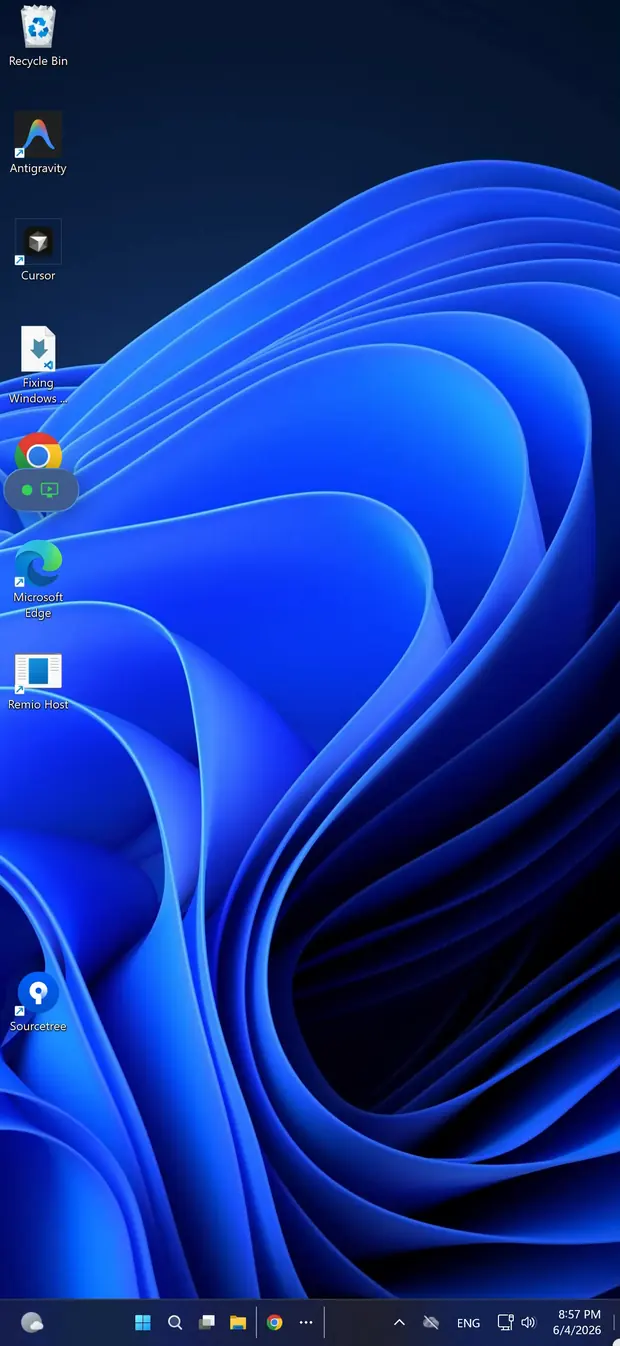
Remio streaming a Windows desktop on iPhone — no account, no commercial-use flag
✦The factual record

What Remio is built with, what it costs, what it measures

No marketing adjectives — just the design decisions and the measured numbers behind them.

01
100% native apps

Native on every platform — no Electron anywhere

Every Remio app is a native app for its platform: iPhone and iPad, Mac, Android, and Windows. There is no Chromium runtime, no JavaScript bridge, and no web view in the rendering path — frames go from the hardware decoder to the screen the way the OS intends.

02
Free to use

No per-seat fee — no commercial-use detection

Remio's core remote desktop is free, no matter how you use it: 120 FPS streaming, display switching with a dedicated virtual display, unattended access, Wake-on-LAN, end-to-end encryption. There is no commercial-use detector and no session timer — use it at home, at work, or for clients, the free license does not distinguish. Remio Pro is an optional subscription ($1.99 a month) for extras like two-way file transfer and extra virtual displays; it is never required to use Remio.

03
No account · PIN pairing

A QR code or a PIN — new PIN anytime

Pairing two devices takes a QR code or a Device ID and PIN shown on the Connect page of Remio Host. Scan or type them in Remio, and the devices exchange keys and remember each other. No email, no password, no profile, no central user database. There is nothing to sign up for and nothing to breach.

04
End-to-end encryption

End-to-end encrypted — keys never leave your devices

Sessions are encrypted end-to-end, with keys negotiated directly between your devices. Keys never leave the endpoints, so when a relay is needed to cross a strict NAT, it forwards ciphertext it cannot decrypt. The full design is documented in the security whitepaper.

05
Measured, not marketed

About 8 ms of processing latency on LAN — measured internally

On the same network, the processing pipeline — capture, hardware encode, the LAN hop, hardware decode — costs about 8 ms; the rest is your display's own 60 Hz refresh cadence, so your input lands before the next frame draws. Across the internet within the same region, low double-digit milliseconds. Both figures are Remio's own measurements, and the methodology is published on the benchmarks page so you can reproduce them on your own hardware.

06
Quality & platforms

Up to 6K at 120 FPS, display switching included

Streams run up to 6K at 120 FPS on hardware H.265, with H.264 fallback — and display switching, with a dedicated virtual display sized to your device, is fully supported. Hosts run on macOS 15+, Windows 10 (build 19041+)/11 and Linux (X11 and Wayland); clients run on iOS/iPadOS 18+, macOS 15+, Android 12+, Windows 10/11; on Apple Vision Pro, the iPad app runs today (native visionOS client in development).

✦Head to head

TeamViewer vs Remio at a glance

The nine rows that decide most switches.

CapabilityRemioTeamViewer
PriceFree, every platformFree for personal use; Remote Access from $24.90 / month
Account requiredNo — QR or PIN, new PIN anytimeYes — TeamViewer account sign-in
Commercial-use detectionNoneAutomated; false positives cut free sessions to ~5 minutes
E2EE modelEnd-to-end; relay never decryptsAES-256 in transit; relay re-encrypts
LAN latency~8 ms processing (measured internally)~60 ms typical
Max quality6K at 120 FPS, display switching1080p default, 30–60 fps; 4K on paid tiers, 4:2:0
Native vs Electron100% native apps on every platformCross-platform toolkit
PlatformsmacOS, Windows, Linux (host), iOS/iPadOS, Android, visionOSmacOS, Windows, Linux, iOS, Android, ChromeOS, Raspberry Pi
Breach historyNone disclosedCorporate IT environment compromised by APT29 (June 2024); 2016 incident; product network reported unaffected
✦Related comparisons

How Remio compares with other tools

Side-by-side pages for the other tools people compare with Remio.

RustDesk
RustDesk can be self-hosted by running your own relay and ID server; Remio connects without any server of your own. See Remio vs RustDesk.
Chrome Remote Desktop
Chrome Remote Desktop requires a Google account; Remio pairs with a QR code or a Device ID and PIN and no account. See Remio vs Chrome Remote Desktop.
Windows Quick Assist / Apple Screen Sharing
Quick Assist is attended-only and Apple Screen Sharing is Mac-to-Mac only; Remio connects across Mac, Windows, iPhone, iPad and Android. See Remio vs Apple Screen Sharing.
✦The five-minute switch

How to switch in 5 minutes

No migration tools, no exported address books, no account to create. Two installs, one PIN, and an optional toggle for unattended access.

01

Install the host

On the machine you want to reach — macOS 15+, Windows 10 (build 19041+)/11 or Linux (X11 and Wayland) — grab the host from the download page, launch it, and grant the screen-capture permission once. It then waits in the menu bar or system tray.

02

Install the client

On the device you connect from — iPhone or iPad (iOS/iPadOS 18+), another Mac (macOS 15+), Android (12+), a Windows 10/11 PC, or Apple Vision Pro via the iPad app — install the Remio client from the same download page.

03

Pair with the QR code or PIN

The Connect page of Remio Host shows a QR code, a Device ID and a PIN. Scan or type them in Remio, and the devices exchange keys directly and remember each other. Reconnections are instant, no re-entry required.

04

Optional: unattended

Flip on unattended access in the host settings to connect without anyone at the remote end, and enable Wake-on-LAN to wake a sleeping machine first. The full walkthrough is in the getting-started guide.

✦Common questions

Common questions about switching from TeamViewer

The five questions people ask before they replace TeamViewer. Straight answers below.

Is Remio really free?
Yes. Remio's core remote desktop is free on every platform — up to 6K at 120 FPS, display switching with a dedicated virtual display, unattended access, Wake-on-LAN, end-to-end encryption. There is no trial clock and no commercial-use detection deciding you owe money.
Does Remio flag commercial use?
No. Remio has no commercial-use detection of any kind. Use it at work, on client machines, or across an office — no algorithm watches your usage patterns, and no session is ever shortened or blocked.
Is Remio safe?
Yes. Sessions are end-to-end encrypted, with keys negotiated directly between your devices — a relay only ever forwards ciphertext. Because Remio has no accounts, there is also no central password database for an attacker to breach.
Can I use unattended access?
Yes, and it is free. Enable unattended access on the host once and you can connect any time without someone clicking Accept on the remote end. Pair it with Wake-on-LAN to wake a sleeping machine before you connect.
Does it work Mac to Windows / Windows to Mac?
Yes, both directions. Hosts run on macOS 15+, Windows 10 (build 19041+) or 11, and Linux (X11 and Wayland), and any client — iOS/iPadOS 18+, macOS 15+, Android 12+, Windows 10/11 — can connect to any of them.
Remio app icon

Leave the commercial-use detector behind.

Install Remio Host, install Remio, scan the QR code or type the Device ID and PIN once. No account, no usage scoring, no five-minute timer — end-to-end encrypted, native on every platform, and free with no commercial-use detection.